Setting up key forwarding on macOS
Or, you know, just use a normal keyboard and one computer
A problem I've always had switching between macOS and another OS is that the Canadian French layout is slightly different on macOS. For the most part it does not matter, but the biggest offender are curly brackets.
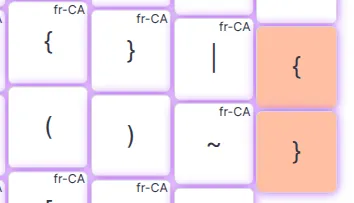
Making custom layouts on Linux is trivial, almost easy on Windows and hell on earth on macOS.
I used to have one and macOS updates would regularly break it, the UI would not show it, my keyboard would get stuck on weird layouts and one time I actually soft-bricked my entire laptop and had to reinstall from scratch. It's a keyboard layout people, what are we doing!
Flashing a different layout every time I switch is obviously impractical, so I eventually gave up and just binded the keys for macOS elsewhere, as shown above. Until today!
skhd's Zig port has a feature to forward keys, so you tap a key and it instead triggers another one, nifty.
The config is a bit wonky, and requires writing hex codes for the keys, which you can get using Key Codes. With the following config I was able to make it so pressing the Linux/Windows curly brackets works on macOS:
alt - 0x27 | alt + shift - 0x21
alt - 0x2a | alt + shift - 0x1e
Pretty cool!